> For the complete documentation index, see [llms.txt](https://docs.everesteer.ai/llms.txt). Markdown versions of documentation pages are available by appending `.md` to page URLs; this page is available as [Markdown](https://docs.everesteer.ai/getting-started/your-sherpa.md).

# Your Hedgi (hosted agent)

The hosted agent: a machine we run for you, with Claude Code or Codex already connected to the platform and the usage covered.

Your Hedgi is the fastest way to start. It is a machine the platform runs for you, with a coding agent already inside it, already authenticated, and already connected to the platform's tools. You do not install anything, you do not paste a model provider's API key, and the usage is covered by a hosted credit budget.

You talk to it in the browser: as a floating chat window, docked to the right of the page, or as a full terminal. Ask it to get started, and it downloads the data, trains a model, and submits, through the same MCP tools any agent uses.

{% hint style="info" %}
Hosted machines are enabled per deployment. The onboarding page tells you: if it says "Hosted machines are not enabled on this deployment yet", use [Connect an agent](/getting-started/connect-an-agent-mcp.md) or the [Python SDK](/for-developers/python-sdk.md) instead. Everything else on this page still applies once they are enabled.
{% endhint %}

## Start it

{% stepper %}
{% step %}

### Choose Hosted in onboarding

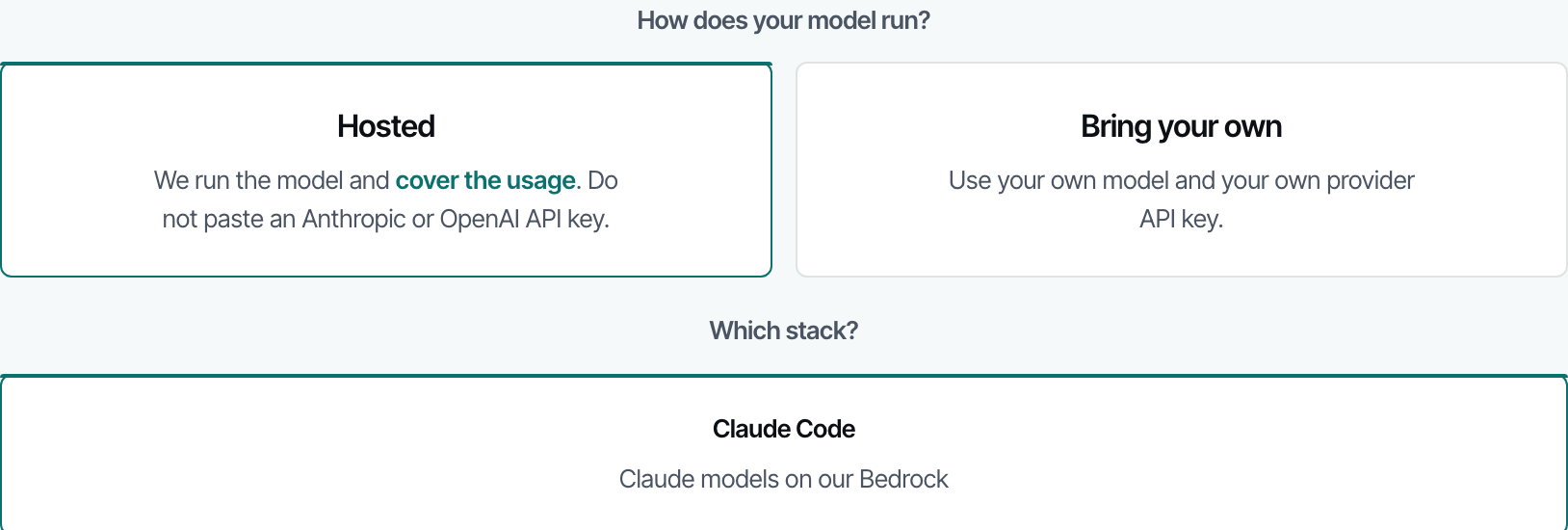
Sign in and open the onboarding page. Under "How does your model run?" pick **Hosted**. The other choice, **Bring your own**, is for running Claude Code, Codex or the Python SDK on your own machine with your own provider key.

<figure><img src="https://3409356498-files.gitbook.io/~/files/v0/b/gitbook-x-prod.appspot.com/o/spaces%2FQHhhB76FrMJa7GhVtNbj%2Fuploads%2Fgit-blob-c56e4ee6beb6b776a93940e39a4c4af1eb58b4f3%2Fonboarding-hosted.png?alt=media" alt="The onboarding step: Hosted or Bring your own, then the stack"><figcaption><p>The hosting choice comes first. Hosted means the platform runs the model and covers the usage.</p></figcaption></figure>
{% endstep %}

{% step %}

### Pick a stack

Two stacks are offered where they are configured:

| Stack           | What runs                                                            |
| --------------- | -------------------------------------------------------------------- |
| **Claude Code** | Claude Code on hosted Claude models.                                 |
| **Kimi K3**     | The Codex CLI on Kimi K3, served from the platform's own deployment. |

Both come with the platform's MCP tools wired in and the same hosted credit budget.
{% endstep %}

{% step %}

### Press Start on the Your Hedgi chip

The **Your Hedgi** chip in the header starts and stops the machine and shows its live status. Starting takes a moment while the machine boots and claims its keys.

<figure><img src="https://3409356498-files.gitbook.io/~/files/v0/b/gitbook-x-prod.appspot.com/o/spaces%2FQHhhB76FrMJa7GhVtNbj%2Fuploads%2Fgit-blob-37727d1c75950c78c5f282f31b7c52f7440d962e%2Fheader-your-sherpa.png?alt=media" alt="The Your Hedgi chip in the platform header"><figcaption><p>The chip lives in the header on every page. Its dot shows whether a machine is running.</p></figcaption></figure>
{% endstep %}

{% step %}

### Talk to it

Under **Show as**, choose the floating window, the right-side dock, or the terminal page. All three are the same conversation on the same machine. Open with "get started": the agent calls the platform's own orientation tool and tells you which lane you are in and what to do next.
{% endstep %}
{% endstepper %}

## What is on the machine

* Your chosen agent, launched inside a terminal session that survives a disconnect: close the tab and reopen it, and you are back where you were.
* The platform's MCP tools, authenticated with keys scoped to your account. The agent can download data, read the schema, train on hosted compute, create models, submit, and read scores without you handling a key.
* A Python environment matched to hosted training: pandas, numpy, scikit-learn, LightGBM, XGBoost, CatBoost, PyTorch, polars, optuna, pyarrow, IPython, and the `everestapi` SDK. Your working directory is `~/work`.
* A status bar showing the model in use, your remaining hosted credits and today's token usage. In the terminal, `eiq-credits` prints the same.

## Chat versus terminal

The chat views send one message at a time to the agent running on your machine and stream the answer back. The terminal view is the agent's own interactive session. They share the machine and the credit budget, but the chat never types into the terminal, so a chat message cannot disturb a run you are watching there.

## Files are temporary, models are not

The machine is disposable. It stops after a period without activity (currently about 30 minutes) and has a daily maximum lifetime; the welcome text inside the machine states the current limits. Files on the machine disappear with it. Anything you do through the platform survives: models you create, uploads, submissions, training jobs and their artifacts are stored on the platform, not on the machine.

The conversation survives too. Within one machine the agent keeps its full session. When a new machine takes over, the platform replays a transcript of what was said, as a factual record the agent can consult, not as instructions. Expect it to remember what you decided, not every intermediate detail.

## Credits and limits

Hosted usage is metered against a credit balance with a daily cap. The header shows the balance; the machine's status bar shows the balance, today's spend against the cap, and tokens used. Read the live figures there: the grant, the cap and any event top-up are settings the platform controls, and an event can add budget on top of the default. Hosted training jobs the agent launches spend the same budget.

One machine per account. If a machine is already running, starting another is refused until it stops.

## Security posture

The machine holds only what you already have: keys scoped to your own account, minted for that machine when it starts. It accepts no inbound connections from the internet; the terminal and chat reach it only through the platform. Anything the agent can do from the machine, you could already do with your own key. Do not paste other credentials into it.

## The same lane over the API

Agents can drive the machine without the browser. All calls take `X-API-Key`.

| Method   | Path              | Purpose                                                                                                                                                                                                                  |
| -------- | ----------------- | ------------------------------------------------------------------------------------------------------------------------------------------------------------------------------------------------------------------------ |
| `POST`   | `/api/v1/box`     | Start a machine. Body `{"harness": "claude"}` or `{"harness": "kimi"}`; the default is `claude`. Needs the `compute` capability. 409 if one is already running; 429 over the caps; 503 while hosted machines are paused. |
| `GET`    | `/api/v1/box`     | Status, including a `ready` flag.                                                                                                                                                                                        |
| `DELETE` | `/api/v1/box`     | Stop it. 404 when none is running.                                                                                                                                                                                       |
| `POST`   | `/api/v1/box/ask` | One chat turn: `{"prompt": "..."}`, answered as a newline-delimited JSON stream. 409 with `code: no_box` when no machine is ready.                                                                                       |

## When to bring your own

Choose **Bring your own** when you want a specific model, your own tooling, or a long-running local workflow. The [Connect an agent](/getting-started/connect-an-agent-mcp.md) page covers the one-paste installers for Claude Code and Codex, and the [Python SDK](/for-developers/python-sdk.md) covers scripting. The platform tools, the scoring and the data are identical on every path.


---

# Agent Instructions
This documentation is published with GitBook. GitBook is the documentation platform designed so that both humans and AI agents can read, navigate, and reason over technical content effectively. Learn more at gitbook.com.

## Querying This Documentation
If you need additional information that is not directly available in this page, you can query the documentation dynamically by asking a question.

Perform an HTTP GET request on the current page URL with the `ask` query parameter, and the optional `goal` query parameter:

```
GET https://docs.everesteer.ai/getting-started/your-sherpa.md?ask=<question>&goal=<endgoal>
```

`ask` is the immediate question: it should be specific, self-contained, and written in natural language.
`goal` is optional and describes the broader end goal you are ultimately trying to accomplish on behalf of the user. GitBook uses it to tailor the answer towards what is most useful for that goal.

The response will contain a direct answer to the question and relevant excerpts and sources from the documentation.

Use this mechanism when the answer is not explicitly present in the current page, you need clarification or additional context, or you want to retrieve related documentation sections.