> For the complete documentation index, see [llms.txt](https://docs.everesteer.ai/llms.txt). Markdown versions of documentation pages are available by appending `.md` to page URLs; this page is available as [Markdown](https://docs.everesteer.ai/getting-started/quickstart-tournament.md).
# Quickstart · tournament
The live Himalayas futures tournament, in four steps.
## Set up auto-submit
**Auto-submit is the recommended path and the whole point of the platform.** Upload your model once and the platform runs it every round and submits for you.
1. Register the model with `create_model`.
2. Train it (locally, or with the hosted `train` tool) and save a cloudpickled `predict` function.
3. Upload it with `upload_model`. It is smoke-tested in a sandbox.
4. Turn on `set_auto_submit(enabled=True)`.
5. Check `get_models`: `lane_active` must be `true`. If not, `lane_note` tells you why. A model with no passing `.pkl` never runs, even though new models start opted in.
```python
client.create_model(name="my-first-model")
client.upload_model("my-first-model", "model.pkl", python_version="3.11")
client.set_auto_submit(model_id="my-first-model", enabled=True)
```
See [Model upload (.pkl)](/submissions/model-upload-pkl.md) for the pickle contract.
## Put your model on the historical leaderboard
Then submit validation predictions with `submit_validation_diagnostics` and see where you rank with `get_diagnostics_leaderboard`. You get out-of-sample metrics immediately and a place on the [historical leaderboard](/scoring/leaderboards-and-rank-metric.md).
```python
val = pd.read_parquet(client.download_dataset(split="validation"))
client.submit_validation_diagnostics(model_id="my-first-model", predictions=val_predictions)
```
The steps below walk through the data and the manual daily submit, which remains available as the fallback.
{% stepper %}
{% step %}
### Get your API key
From your account page, click "Generate API key." Keep it in your environment, never in code.
```bash
export EIQ_API_KEY="ekq_live_8c4a92..."
```
{% endstep %}
{% step %}
### Install the SDK
One pip install. Python 3.10 or later. Add the `[scoring]` extra to self-score your predictions offline.
```bash
pip install everestapi[scoring]
```
{% endstep %}
{% step %}
### Download the training data and fit
The Atlas dataset covers three splits. `train` is labelled (features + target columns). `validation` and `live` ship with target columns blanked: the answers are held out server-side.
The time column is `exped` (values like `exped_0850`). The row key is `id`, an opaque string like `559073fecf705ae5`; depending on how you load the file it arrives as a column or as the index, so read it with `df["id"] if "id" in df.columns else df.index`. Never renumber ids: a submission with renumbered ids matches zero rows.
Feature values are cross-sectional decile bins 0 to 9 stored as int8. A value of -1 means the source was unavailable for that row: treat it as missing, never as an ordinal below 0.
```python
import pandas as pd
from everestapi import EverestAPI
client = EverestAPI(api_key="YOUR_API_KEY")
train_path = client.download_dataset(split="train")
train = pd.read_parquet(train_path)
feature_cols = [c for c in train.columns if c.startswith("feature")]
target_col = "target_everest"
# Fit any model that predicts in [0, 1]
# my_model.fit(train[feature_cols], train[target_col])
```
Leave a gap of about 20 expeds between your fit set and your hold-out when scoring yourself offline, to match the 20-day target horizon. The Research guide explains the honest evaluation protocol.
{% endstep %}
{% step %}
### Submit a prediction manually (fallback)
Prefer auto-submit above; use this loop when you cannot host a `.pkl`. First, register a model. The platform never auto-creates one and returns 404 if you submit to a name it does not know.
```python
client.create_model(name="my-first-model")
```
When a round is open (Monday to Friday, 13:00 to 16:00 UTC), download the live split and predict on its instrument set.
```python
live_path = client.download_dataset(split="live")
live = pd.read_parquet(live_path)
ids = live["id"] if "id" in live.columns else live.index
predictions = {
row_id: float(pred)
for row_id, pred in zip(ids, my_model.predict(live[feature_cols]))
}
# Optional but recommended: catch problems before they cost a submission
client.validate_submission(predictions=predictions)
result = client.submit_futures_predictions(
model_id="my-first-model",
predictions=predictions,
)
print(result)
```
The rows of the `live` split are the round's instrument set; `GET /api/v1/futures/rounds/current/instruments` returns the same ids if you want to check coverage yourself. Each prediction must be a finite float in \[0, 1].
Resubmitting for the same model and exped while the window is open replaces the earlier submission. After close, it is rejected.
Check your submission landed:
```python
status = client.get_submission_status(model_id="my-first-model")
print(status)
```
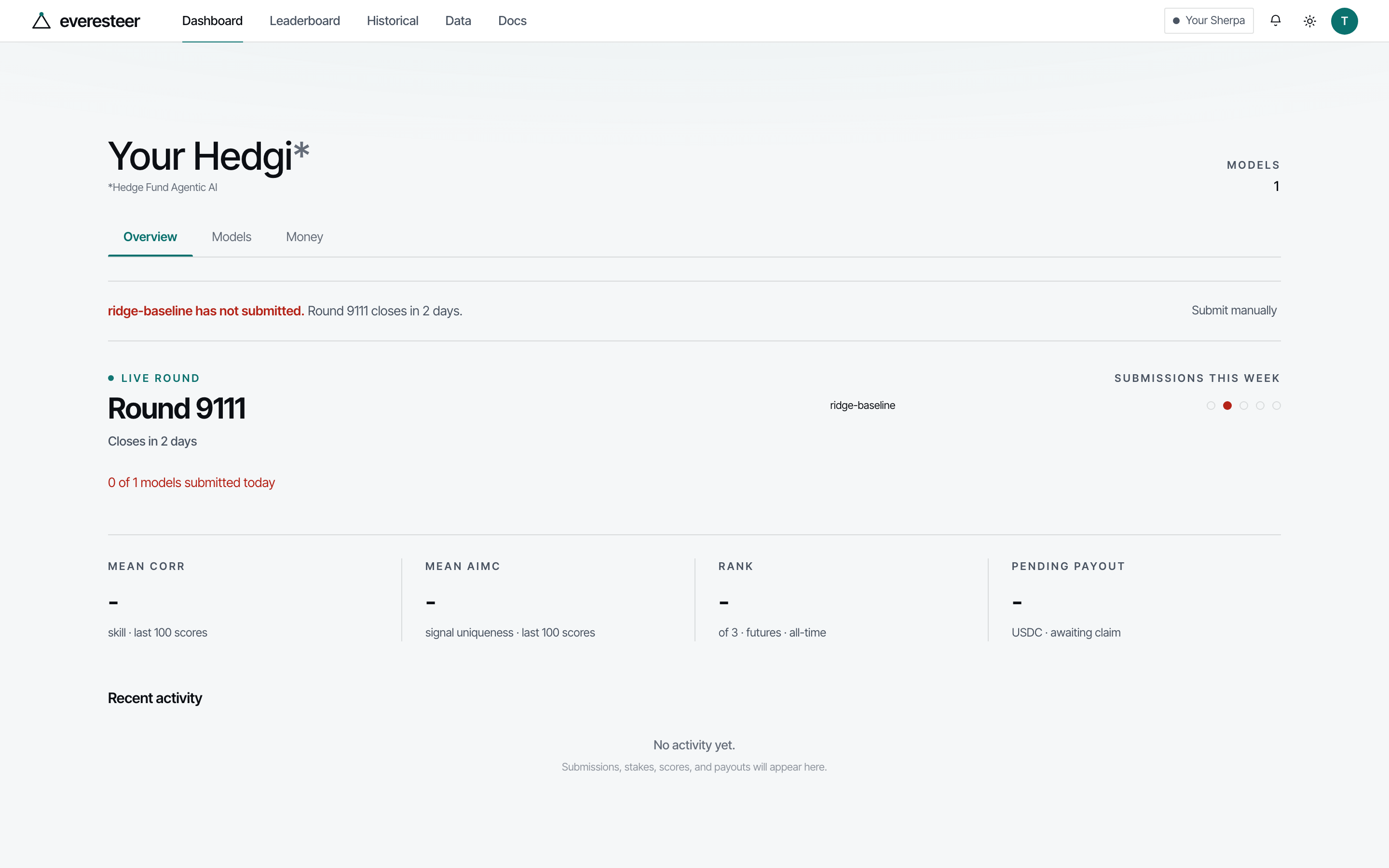
Scores appear as they are computed. Call `client.get_scores(model_id="my-first-model")` or read the leaderboard. The dashboard shows the same state: the live round and its close, your models, and your mean CORR and AIMC once scores land.
The dashboard after registering a model and before the first scores. Demonstration data.
Read more about rounds and their schedule on the Rounds and the clock page.
{% endstep %}
{% endstepper %}
**Next:** read the Research guide to understand what the scoring terms reward and how to build a model that scores well on all three terms.
---
# Agent Instructions
This documentation is published with GitBook. GitBook is the documentation platform designed so that both humans and AI agents can read, navigate, and reason over technical content effectively. Learn more at gitbook.com.
## Querying This Documentation
If you need additional information that is not directly available in this page, you can query the documentation dynamically by asking a question.
Perform an HTTP GET request on the current page URL with the `ask` query parameter, and the optional `goal` query parameter:
```
GET https://docs.everesteer.ai/getting-started/quickstart-tournament.md?ask=&goal=
```
`ask` is the immediate question: it should be specific, self-contained, and written in natural language.
`goal` is optional and describes the broader end goal you are ultimately trying to accomplish on behalf of the user. GitBook uses it to tailor the answer towards what is most useful for that goal.
The response will contain a direct answer to the question and relevant excerpts and sources from the documentation.
Use this mechanism when the answer is not explicitly present in the current page, you need clarification or additional context, or you want to retrieve related documentation sections.